
You’ve written blog posts before. You spent hours researching, drafting, and editing. You hit publish. Then… crickets. No traffic, no comments, no leads. It’s frustrating, and it’s the reason most businesses give up on blogging. But here’s the truth: the problem isn’t that blogging doesn’t work. The problem is that most people don’t know how to write SEO blog posts that rank. They write for themselves, not for search engines. They skip the structure Google expects. They forget to optimize for the reader’s intent. In 2026, the rules are clearer than ever. Google rewards content that is helpful, well-structured, and authoritative. If you follow a proven framework, you can consistently rank on page 1. This guide will show you exactly how to do it, step by step.
Why Most Blog Posts Never Rank (And How to Fix It)
The biggest mistake I see is treating a blog post like a diary entry. You write what you want to say, not what your audience is searching for. Google’s algorithm has evolved. It doesn’t just look for keywords anymore. It looks for topical authority, user engagement signals, and content that satisfies search intent. If you want to write SEO blog posts that rank, you need to start with the reader’s problem, not your product. For example, if you sell project management software, don’t write “Our Software Is the Best.” Write “How to Manage Remote Teams Without Losing Your Mind.” That’s what people search for. That’s what ranks.
Step 1: Find a Keyword That Actually Drives Traffic
Before you write a single word, you need a target. The long-tail keyword for this post is “write SEO blog posts that rank,” and it’s a perfect example of what you should aim for. It’s specific, it has clear intent, and it’s not impossibly competitive. Use tools like Ahrefs, SEMrush, or even Google’s “People Also Ask” to find keywords your audience uses. Look for questions, comparisons, and how-to phrases. These are the queries that convert. Once you have your keyword, place it naturally in your H1, your opening paragraph, and at least one H2 subheading. Don’t stuff it. Just use it where it makes sense.
Step 2: Structure Your Post for Google (and Humans)
Google loves a well-organized article. Use descriptive H2s and H3s that break your content into digestible sections. Each subheading should tell the reader what they’ll learn. For example, instead of “Introduction,” use “Why Most Blog Posts Never Rank (And How to Fix It).” Instead of “Conclusion,” use “Your Next Step: Publish a Post That Actually Works.” This structure helps Google understand your content’s hierarchy and makes it easier for readers to scan. When you write SEO blog posts that rank, every heading is a promise you deliver on.
Step 3: Write for the Reader, Then Optimize for Search
Here’s where most people get it backward. They write for Google first, stuffing keywords and ignoring readability. That doesn’t work anymore. Write naturally. Use short paragraphs. Include examples. Tell stories. Then, go back and optimize. Add your target keyword where it fits. Include internal links to other relevant posts on your site. Use descriptive alt text for images. For instance, if you’re writing about AI SEO tools, you might include a screenshot of a dashboard like this one:
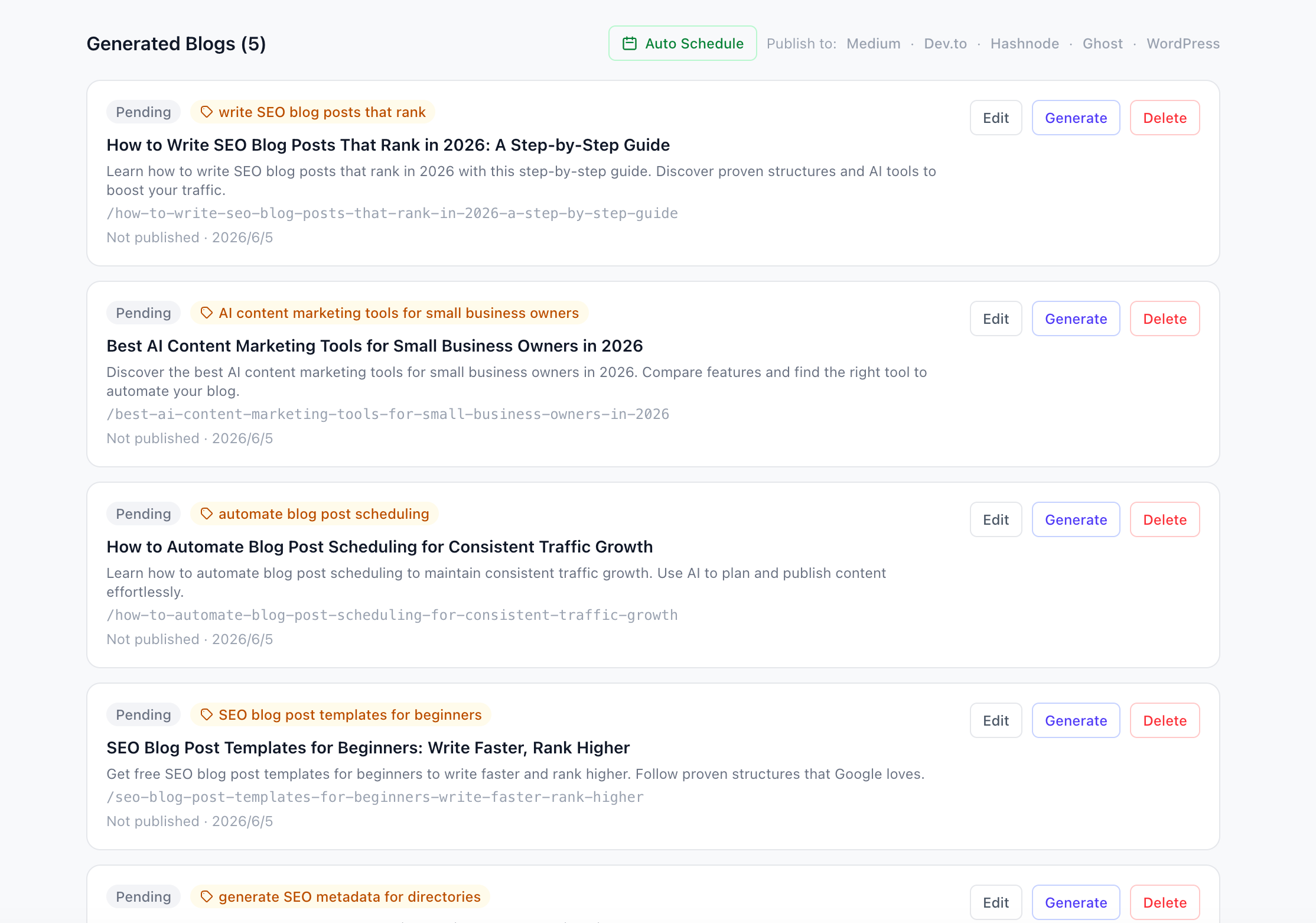
This image shows a clean interface where you can manage drafts, schedule posts, and see your content pipeline at a glance. It’s the kind of visual that adds context and breaks up text.
Step 4: Add Real Examples and Data
Generic advice doesn’t rank. Specific advice does. When you explain a concept, back it up with a real example. If you’re talking about metadata, show a screenshot of a directory listing tool:

This interface generates 19 metadata fields in one click. That’s a concrete feature you can mention. Numbers and specifics build trust. They also signal to Google that your content is authoritative.
Step 5: Use Images That Support Your Message
Images aren’t just decoration. They should reinforce your points and improve the user experience. When you upload screenshots of your product or tool, make sure they’re clear and relevant. For example, if you’re explaining how to generate blog titles, include a screenshot of the title generation interface:
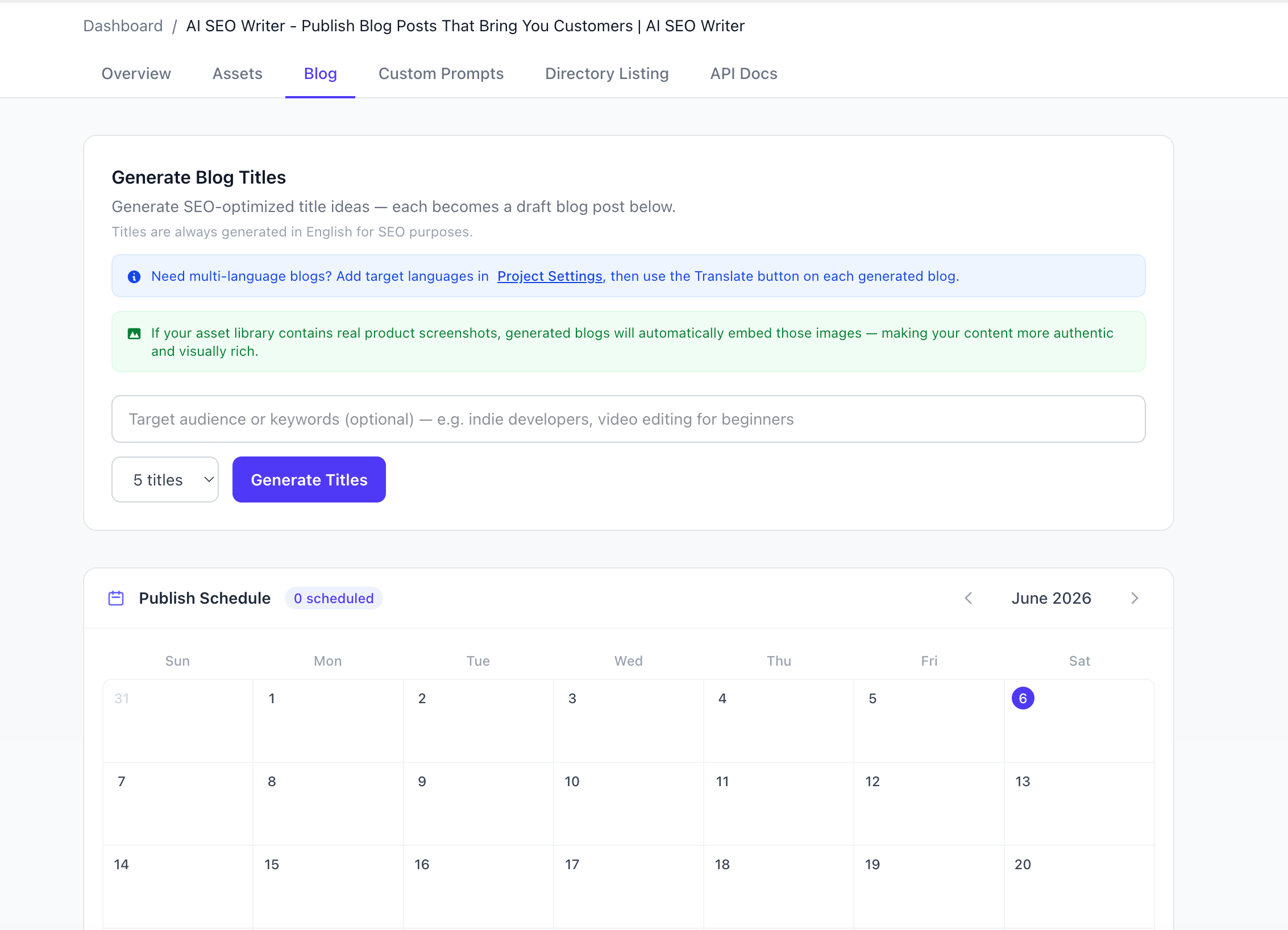
This image shows exactly how the tool works. It’s not a stock photo. It’s a real UI that helps the reader visualize the process. Google also indexes image alt text, so use descriptive phrases like “AI SEO Writer blog title generator with scheduling calendar.”
Step 6: Optimize Your Meta Data and URL
Your title tag and meta description are what show up in search results. Make them compelling. Include your target keyword. Keep your title under 60 characters and your meta description under 160. Your URL slug should be short and include the keyword. For this post, a good slug would be /write-seo-blog-posts-that-rank. Avoid stop words like “and” or “the” when possible. Every character counts.
Step 7: Publish and Promote
Once your post is live, don’t just leave it. Share it on social media, include it in your newsletter, and reach out to other sites for backlinks. Google notices when people engage with your content. If you want to write SEO blog posts that rank consistently, you need to treat each post as an asset, not a one-off task.
Your Next Step: Write a Post That Actually Works
You now have a clear framework. Start with a keyword that matters. Structure your post for readability. Write for your reader first, then optimize. Use real examples and images. And don’t forget to promote. The difference between a post that ranks and one that doesn’t is often just a few intentional decisions. If you want to speed up the process, tools like AI SEO Writer can help you generate structured, SEO-optimized drafts in minutes. But the strategy is always the same: write for people, structure for Google, and publish consistently. Your next blog post could be the one that brings you customers.